This was the first project that solved a real problem I had with my friends. We always liked electronic music and used to get together on weekends to DJ.
One day, Spotify stopped being compatible with DJ software (like Traktor or Serato), which made downloading new songs complicated. For every new song, you had to use an external converter, copy the link, download, and rename the file manually. The alternative was paying for a subscription to some other software.
The idea of the project was to automate this process so that when adding a song to a Spotify playlist, it would automatically be downloaded to your computer's folder.
Spotify 2 Folder
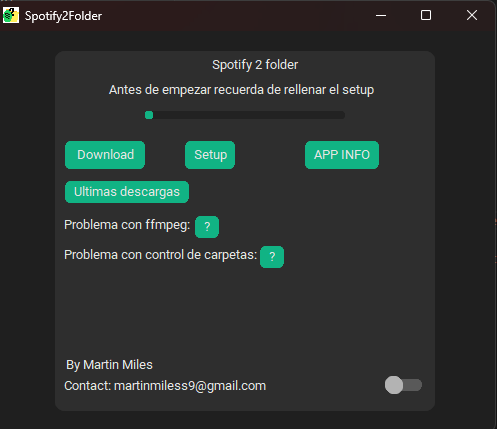
Spotify 2 Folder is a desktop application that manages music downloads. The program monitors a selected Spotify playlist and downloads any new song directly to a local folder on your computer.
How does it work?
It works by connecting the Spotify API with YouTube:
- Playlist Reading: The application connects to the Spotify API using
spotipyto read all the songs in your target playlist. - Local Comparison: It scans your download folder to see which songs you already have. If a song is in the playlist but not in the folder, it is marked for download.
- YouTube Search: For each missing song, the script automatically searches for the "Official Video" or the best audio match on YouTube.
- Download and Conversion: Using
yt-dlpandffmpeg, it downloads the video's audio and converts it to an MP3 file, naming it with the artist's name and the song title.
Technologies Used
The project is built entirely in Python, using:
- Spotipy: For OAuth2 authentication and communication with the Spotify API.
- Youtube Search & yt-dlp: To find and download audio sources.
- CustomTkinter: To create a graphical and easy-to-use interface.
- FFmpeg: For audio conversion.
Setup and Usage
So that the user could use it, I created a setup interface where you simply paste your credentials and links.
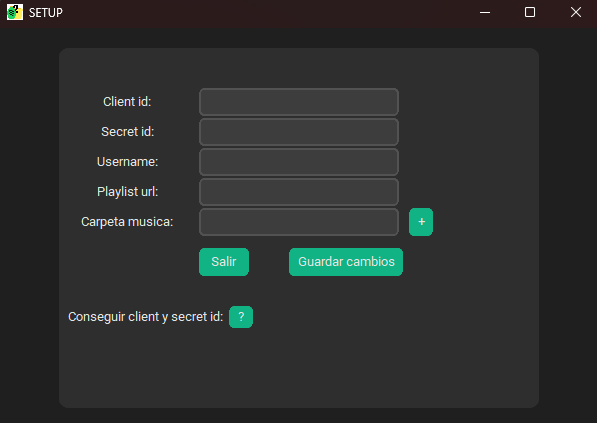
The setup.txt file saves locally:
client_idandclient_secretfrom your Spotify developer account.- Your username.
- The URL of the playlist to monitor.
- The path of the folder where you want the music.
Once configured, you just have to open the app and click "Download". The progress bar will notify you when your music is ready.